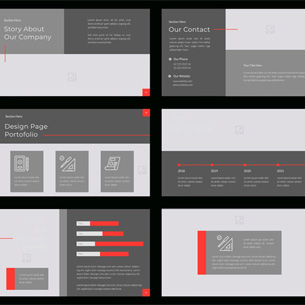
Should you build a slide library?




When a slide library is essential (and what it should include)
If your team keeps reinventing the wheel with every presentation, a slide library might be one of the most impactful creative tools you’re not using.
We see it all the time: smart people wasting time hunting down past decks, copying outdated slides or designing new layouts from scratch — only to end up with inconsistent, off-brand presentations that don’t work.
At Notion, we build flexible, brand-aligned slide libraries for teams of all sizes — often during a rebrand, product launch or template refresh.
Ask yourself: Is a slide library right for your organization right now?
Let’s dig in.
What is a slide library?
A slide library is a curated set of reusable PowerPoint slides designed to save time, boost consistency and make teams more self-sufficient.
Think of it like a LEGO set: Instead of giving your team a finished model, you give them the best pieces to build their own — within your brand and message guardrails.
We typically organize slide libraries by:
- Common content types (e.g., team overview, product roadmap, customer story)
- Layout types (e.g., side-by-side comparison, quote slide, process diagram)
- Audience or use case (e.g., external sales vs. internal comms)
A good library should be searchable, skimmable, editable and clearly on-brand — not just “inspiration slides” (though it can serve dual purposes) or a dumping ground of past work.
What a slide library is not
- NOT a template with just a cover and content slide
- NOT a .zip file of outdated decks with no instructions
- NOT a one-time document with no plan to maintain or evolve it
Slide libraries are living tools. We often help clients refresh them as new messaging rolls out, brand updates happen, or product portfolios evolve.
When a slide library makes sense
A slide library is most valuable when:
You have lots of users building decks
From marketers to execs to field teams — if your company creates a lot of presentations, this gives them a smarter starting point.
You’re repeating similar stories
Product launches. Roadmaps. Market overviews. A good library lets you pull from slides that already work — and update them without starting from scratch.
We’ve had clients pull out decks from five (or more) years ago and say, “Can you make it like this one?” … only to discover we had designed it back then, too.
You’re constantly correcting off-brand slides
We’ve seen it all — Comic Sans, pixelated logos, random color schemes. A slide library helps elevate presentations and supports brand compliance without being restrictive.
Your Sales and Marketing teams aren’t aligned
Too often, sales decks get rewritten by every rep. A well-built library offers customizable slides that stay consistent but feel flexible. It can also give multiple design options, so Sales teams feel like they have a choice and Marketing is listening to their special cases.
What to include in a great slide library
Here’s what we often build for clients — and why:
| Component | Why it matters |
| Branded master template | The foundation for all formatting, layout and styles. |
| Core slides (top 10–20) | Your “greatest hits” — slides that appear in 80% of decks. |
| Pre-built layouts | Designed for specific content types (e.g., timelines, breakers, quotes/callouts, sidebars, column options). |
| Icons + image library | Easy access to approved visuals keeps things consistent. |
| Do’s & don’ts guide | Helps non-designers understand how to use (and not abuse) the library. |
| Editable charts & graphs | Stylized but usable — especially important for sales and strategy decks. |
What happens when it’s done right
When your team has the right tools:
- Sales teams create better decks faster
- Marketers spend less time fixing formatting and more time driving strategy
- Brand integrity improves across the board
- Internal comms becomes more engaging and trusted
- Presentation designers (like us) get to spend more time on new creative — not the basics
When to build it
Some great times to launch or overhaul a slide library:
- After a rebrand or brand refresh
- Ahead of a product launch or market expansion
- As part of a PowerPoint template redesign
- After a new CMO or head of sales joins the organization
- When you realize, “We’re wasting a lot of time on presentations.”
A well-made library changes the game, presentations get sharper, teams get faster and brands show up stronger. If your organization is spending too much time on presentations, it’s not a matter of whether you should build a library, but when.
Our team here at Notion would be happy to help you build a great slide library for your company.